Bruantech Logo
BRUANTECH

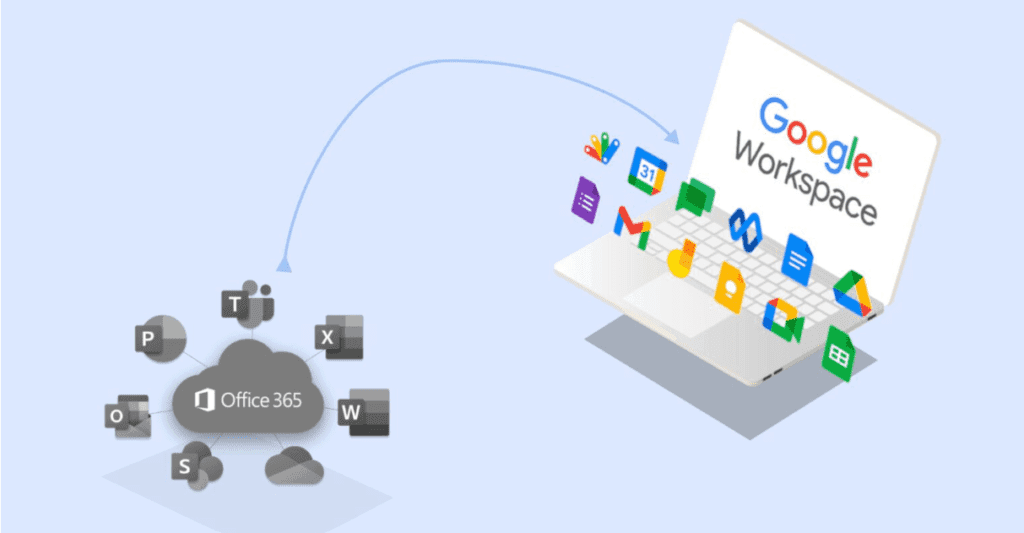
The Ultimate Guide to Migrating from Microsoft 365 to Google Workspace

The Ultimate Guide to Migrating from Microsoft 365 to Google Workspace

ADMIN
ADMINDesign Director
Published

The Ultimate Guide to Migrating from Microsoft 365 to Google Workspace

Moving from Microsoft 365 to Google Workspace is more than switching email providers.

For a business, the process can involve email accounts, calendars, contacts, files, permissions, domains, applications, security policies, and the everyday workflows employees depend on.

When handled properly, migration can be a smooth transition that improves collaboration and simplifies how teams work.

When handled poorly, it can result in missing data, interrupted email delivery, broken workflows, and frustrated employees.

The key is preparation.

Why Businesses Move to Google Workspace

Organizations move from Microsoft 365 to Google Workspace for different reasons.

Some want a more browser-first working environment. Others prefer Google's approach to collaboration, document management, communication, or administration.

Google Workspace brings tools such as Gmail, Google Drive, Docs, Sheets, Slides, Meet, Calendar, and other services into one cloud-based ecosystem.

For businesses already working heavily online, this can create a simpler collaboration experience.

But the decision should be based on business requirements rather than simply choosing whichever platform feels more modern.

Start With an Inventory

Before migrating anything, understand what currently exists in your Microsoft 365 environment.

Create an inventory of:

This step is often overlooked.

You cannot plan a successful migration if you do not know what needs to move.

Understand What Actually Needs to Move

Not every Microsoft 365 service has a direct equivalent in Google Workspace.

Email can move from Outlook/Exchange to Gmail.

Calendars can be migrated to Google Calendar.

Contacts can be moved into Google Contacts.

Files can be transferred into Google Drive.

However, applications and workflows may require additional planning.

Microsoft Teams conversations, SharePoint structures, custom Microsoft integrations, Power Automate workflows, and other Microsoft-specific services may not translate directly.

The goal is therefore not necessarily to create a perfect one-to-one copy.

The goal is to recreate the business workflow effectively in the new environment.

Plan Your Domain Migration Carefully

Your domain is one of the most important parts of the migration.

For example, if employees currently use:

name@company.com

they should continue using the same address after the migration.

The domain itself does not need to change simply because the email platform changes.

What changes is where the domain's email traffic is directed.

This is controlled through DNS records, particularly the domain's MX records.

Before changing them, make sure the Google Workspace environment is properly configured and accounts have been created.

Changing DNS too early can interrupt email delivery.

Prepare Google Workspace First

Do not begin by immediately switching email traffic.

Set up the Google Workspace environment before the final cutover.

This includes:

The new environment should be ready before users are moved across.

Migrate Email

Email is usually one of the most important parts of the migration.

Businesses often need to preserve historical messages, folders, attachments, and other mailbox data.

Google provides migration options for moving mail from existing systems into Gmail, but the appropriate method depends on the organization's size, source environment, and migration requirements.

Before starting the full migration, perform a test migration.

Choose a small number of accounts and verify:

A successful pilot gives you an opportunity to identify problems before they affect the entire organization.

Move Files Carefully

Files can be more complicated than email.

Microsoft 365 environments may contain data across OneDrive, SharePoint, Teams, and local computers.

Before moving files, determine:

Simply copying everything into Google Drive can create a new mess in a different platform.

Migration is an opportunity to clean up the organization's information architecture.

Rebuild Permissions

Permissions should receive special attention.

Microsoft 365 and Google Workspace use different approaches to sharing and access management.

Do not assume that existing permissions will automatically translate perfectly.

Define who should have access to:

A clean permission structure improves both security and usability.

Prepare Your Employees

Technology migration is also a people problem.

Employees may be familiar with Outlook, Word, Excel, Teams, and OneDrive.

Moving to Gmail, Docs, Sheets, Meet, and Drive changes everyday workflows.

Provide employees with clear instructions before the migration.

Explain:

Even a technically perfect migration can feel like a failure if users are not prepared.

Choose the Right Cutover Strategy

There are several ways to approach the final transition.

A smaller organization may be able to migrate everyone at once.

A larger organization may prefer a phased approach, moving departments or groups over time.

The right approach depends on the organization's size, technical environment, risk tolerance, and operational requirements.

Whatever approach you choose, schedule the final cutover carefully.

Avoid making major DNS or email changes during critical business periods.

Update DNS Records

Once Google Workspace is ready and the migration plan has been tested, email traffic can be redirected to Google's infrastructure.

This involves updating the domain's DNS configuration, including MX records.

DNS changes can take time to propagate.

During this period, email delivery should be monitored carefully.

Do not assume that because one user can send and receive email, the entire migration is complete.

Test multiple accounts and external senders.

Reconfigure Applications and Integrations

Businesses rarely use email and storage in isolation.

Your website, CRM, accounting software, marketing tools, forms, calendars, authentication systems, and other applications may depend on Microsoft 365.

After the migration, test these integrations.

Pay particular attention to:

A migration is not complete until the surrounding ecosystem works.

Strengthen Security After Migration

Use the migration as an opportunity to review security.

Configure appropriate authentication policies, recovery options, administrative roles, device controls, and access permissions.

Multi-factor authentication should be strongly considered for organizational accounts.

Administrative access should also be limited to the people who genuinely need it.

Security should be designed into the new environment rather than treated as a final checklist item.

Do Not Immediately Abandon Microsoft 365

Once the migration appears successful, resist the temptation to immediately delete the old environment.

Keep appropriate backups and maintain the old environment for a planned transition period where necessary.

Monitor the new environment for issues.

Look for:

Only decommission the old environment once you are confident that the business has fully transitioned and any required retention obligations have been addressed.

The Migration Is Only the Beginning

Moving from Microsoft 365 to Google Workspace is not simply a technical switch.

It is an opportunity to rethink how your organization communicates, stores information, collaborates, and manages access.

A successful migration combines:

Planning.

Data management.

DNS and email configuration.

Security.

Employee training.

Testing.

Post-migration support.

The technology may change in a matter of days, but the workflows built around it can affect the business for years.

That is why the best migrations focus on more than moving data.

They build a cleaner, more secure, and more efficient digital workplace for what comes next.

MORE FROM OUR BLOG

Related Articles

Launching Your Ecommerce Venture in 2026: The Complete Starter's Guide
GOOGLE

Launching Your Ecommerce Venture in 2026: The Complete Starter's Guide

Codematic would like to provide you with everything you need for your e-commerce startup in 2023. We understand the difference between starting and starting right.

READ MORE »
Google Workspace vs. Microsoft 365: An In-Depth Look at Pricing and Value for Modern Businesses
GOOGLE

Google Workspace vs. Microsoft 365: An In-Depth Look at Pricing and Value for Modern Businesses

Codematic would like to provide you with everything you need for your e-commerce startup in 2023. We understand the difference between starting and starting right.

READ MORE »
Google AppSheet - The Ultimate No-Code Solution for Your Business
GOOGLE

Google AppSheet - The Ultimate No-Code Solution for Your Business

Codematic would like to provide you with everything you need for your e-commerce startup in 2023. We understand the difference between starting and starting right.

READ MORE »

Schedule A Free
Consultation

We're here to respond to your questions and guide you in selecting the services that best align with your needs.
Booking Calendar Interface